Community platform features for nonprofits, churches, and associations

Every feature CommunitiesOS includes. Built for nonprofits, churches, and associations - not creators.

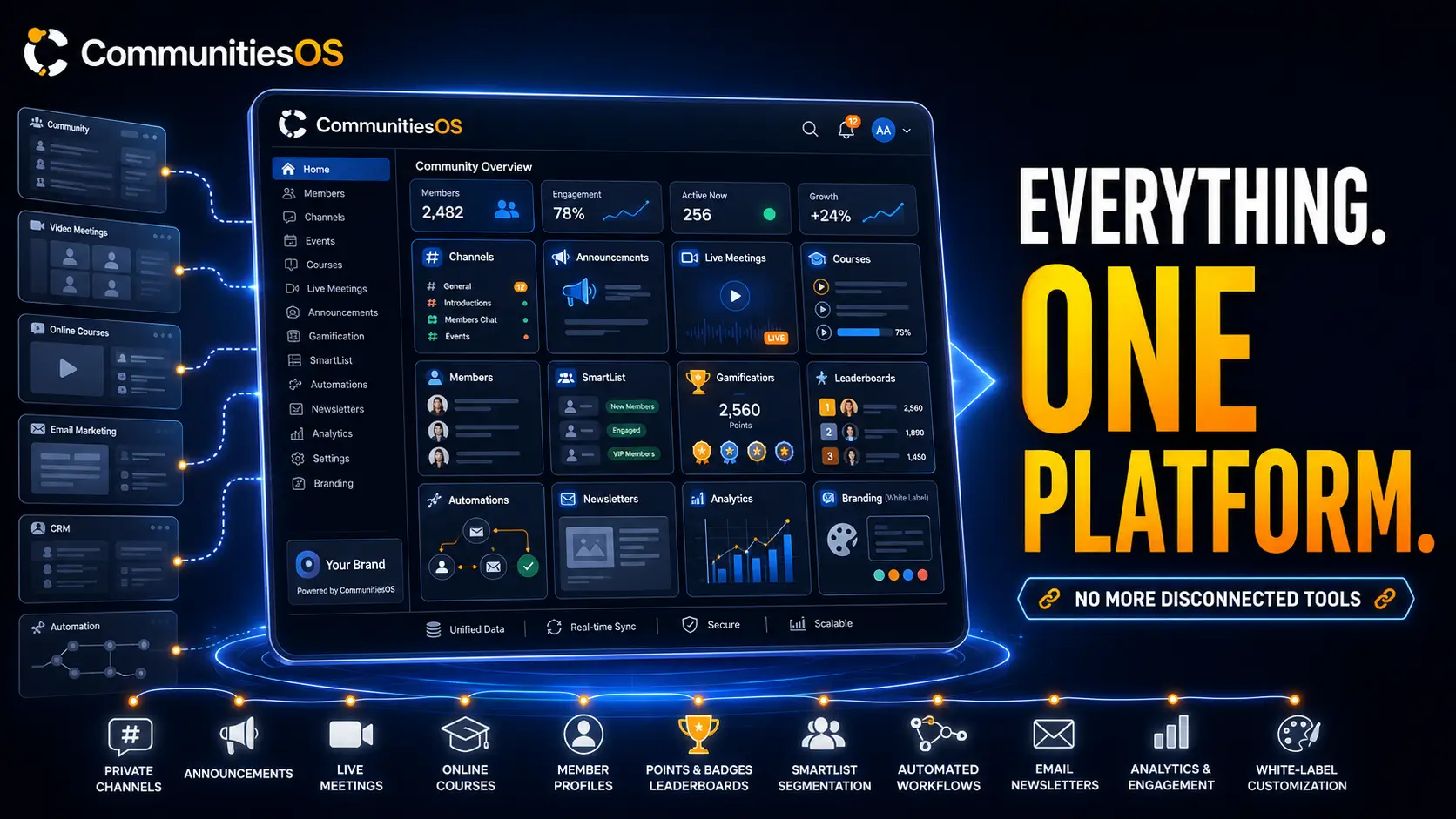
CommunitiesOS is a private community platform built around how nonprofits, churches, and associations actually operate. Every feature listed on this page exists because a church administrator, a nonprofit program director, or an association chapter chair needs it - not because it helps a creator retain subscribers. Private channels for committees and ministry teams. An announcement channel with guaranteed push notification delivery to every member. Live meetings with no participant cap and no time limit. CRM integration so your community data flows directly into your member management workflow. Everything your organization needs. Nothing you will never use.

Private channels Announcement channel Live meetings Member management CRM integration White-label branding Workflow automation

Trusted by organizations across all 50 states

What CommunitiesOS includes

CommunitiesOS includes a private invite-only community with role-based access control, private channels for committees and ministry teams, a dedicated announcement channel with push notifications to every member, built-in live meetings with no participant limit and no time limit, 1-on-1 direct messaging, community events with calendar integration, CRM integration and Smart List member segmentation, workflow automation for granting and revoking access, white-label branding with custom domain, and full member data ownership with export. Every feature is available across all three plans - Foundation at $97 per month, Growth at $297 per month, and Authority at $497 per month - with zero transaction fees and no per-member fees on any plan.

Community platform features built for nonprofits, churches, and associations.

Most community platform features pages list the same things: channels, events, live streaming, member management. What matters is not the list. It is whether each feature was designed for how your organization operates. A private channel on a creator platform was designed to gate premium content. A private channel on CommunitiesOS was designed for your finance committee, your building team, or your pastoral care ministry - with access controlled per member and no channel visible to anyone who was not specifically added to it. That distinction runs through every feature on this page.

CommunitiesOS does not include built-in course hosting, content monetization tools, or creator discovery features - features that a nonprofit, church, or association will never use.

Community and privacy

Private community built for organizational structure - not public discovery.

CommunitiesOS is invite-only on every plan. Your members never see competing organizations, suggested content from other groups, or anything your organization did not put there. The entire community structure is designed around how organizations operate - with distinct roles, controlled access, and private spaces for every layer of your structure.

Private groups with approval-required access

Every CommunitiesOS community is private by default. Only members can see posts and other members. All join requests require manual admin review even when a member uses an invite link. Switching a group from public to private immediately restricts all existing content to current members only. Your congregation, your donor community, and your dues-paying members are not a public audience.

Four-tier role system for organizational governance

Owner, Admin, Channel Manager, and Contributor - each role with distinct permissions defined for how organizations actually assign responsibility. Owners control everything including group deactivation. Admins manage members, content, roles, and invitations. Channel Managers have admin authority over a specific channel without group-level admin access - exactly the permission structure a committee chair or ministry team leader needs. Contributors participate based on the group's privacy settings and channel access.

Private channels for committees, ministry teams, and chapters

Create private channels inside any group. Members who are not explicitly added cannot see the channel in the channel list at all - it does not exist for them. Channel managers are appointed at the channel level independently of group roles, so a committee chair has admin authority over their channel without any access to other channels or group settings. Channels can be converted between public and private at any time. A finance committee, a pastoral care team, a board of directors, and a volunteer coordinator group can each have their own private channel inside the same community with complete separation between them.

Screening questions before membership is granted

Configure questions that appear when a member requests to join a private group. Review answers before approving or declining access. Ensure every member who joins your community understands its purpose and meets your organization's criteria before they can see any content.

White-label community with custom domain and full branding

Connect your organization's domain, apply your logo and brand colors, and configure the community's name and identity. Your members experience the community entirely under your organization's brand. No CommunitiesOS branding visible anywhere. Custom CSS and JavaScript can be added for advanced styling beyond the built-in theme options. The community looks, feels, and functions as yours.

Group ownership transfer for organizational continuity

Transfer group ownership to another member when leadership changes. No community rebuild required. No data loss. Your organization's community continues without interruption when executive directors transition, senior pastors move on, or board chairs rotate.

Announcement channel

Announcement channel with guaranteed push notification delivery to every member.

Most community platforms rely on algorithms to surface posts to members. CommunitiesOS's announcement channel does not. Every post in an announcement channel sends push notifications to every member immediately. No algorithm. No engagement score. No member has to follow anyone or adjust notification settings to receive your organization's announcements.

Read-only channel - only admins and owners can post

The announcement channel is a specialized channel where only community admins and owners have posting access. Members see a read-only view with no input field. Every post triggers push notifications to all members via in-app, email, and push simultaneously. Important updates cannot get buried in active discussion threads because the announcement channel is structurally separate from all other channels.

Push notifications to every member on every post

Every announcement channel post sends notifications through three channels simultaneously: in-app notification, email, and push notification to the member's device. Members receive your announcements whether they are actively inside the community or not. A Sunday service reminder, a last-minute event change, an urgent pastoral communication - every member receives it the moment you post.

Unlimited announcement channels per community

Create as many announcement channels as your organization needs. A general announcements channel for all members, a leadership channel for board and admin updates, a ministry-specific channel for a particular team. No limit on the number of announcement channels. Each can be set to public or private visibility, and can be converted back to a regular discussion channel at any time.

Pinned announcements stay visible at the top for all members

Pin critical messages at the top of any channel so they remain visible for every member who opens it. Event reminders, organizational policies, onboarding instructions, or any update that needs persistent visibility stays pinned until you remove it. Pinned announcements appear above all other posts for all members regardless of when they join.

Enable or disable comments on any post

Choose whether each post invites discussion or remains read-only. A policy update, a board resolution, or a schedule change may not require member responses - disable comments and members see a clear message instead of an input field. Comments can be re-enabled on any post at any time. Applies to all post types including announcements, discussions, resources, and updates.

Want to see the announcement channel in action for your congregation? Book a 15-minute walkthrough →

Live meetings

Live meetings and broadcasts built in. No participant limit. No time limit. No Zoom required.

CommunitiesOS includes native live meetings and live streaming directly inside the community. No external tool required. No Zoom account. No separate broadcast software needed for most use cases. Two modes cover every live session a nonprofit, church, or association runs.

Meeting Room mode for board sessions, committee meetings, and small groups

Meeting Room is an interactive many-to-many live session. Every participant can speak, share their screen, raise their hand, and react. Host controls include managing speaking permissions, removing disruptive participants, and controlling dynamic layout. No participant cap. No maximum session length. Invite guests and assign host or speaking permissions during the session. Recording is available with optional replay saved as a post after the session ends. Board sessions, committee meetings, small group gatherings, and leadership calls all run natively inside your community without members leaving the platform.

Stream mode for congregation broadcasts and all-hands events

Stream Software mode connects to OBS, StreamYard, Zoom, or any RTMP-compatible encoder. Broadcast your Sunday service, your annual membership meeting, or your organization-wide all-hands event to your entire community. A persistent stream key means you reuse the same setup across sessions - no reconfiguration required. No participant cap. No time limit. Members receive push notifications when the stream goes live and join directly from the community without needing a separate streaming link.

Zoom's free plan limits meetings to 40 minutes. CommunitiesOS live meetings have no time limit on any plan.

Optional session replays saved as community posts

Enable the replay option before going live and the session is automatically saved as a post in the channel after it ends. Members who could not attend watch on their schedule. The replay lives inside the community where it belongs - not in a separate video library, not in a shared Google Drive folder, not in a YouTube link shared via email.

See CommunitiesOS live meetings in action →
Member management

Member management built for organizational teams - not solo administrators.

CommunitiesOS is designed to be administered by a two-person nonprofit staff team, a church office manager, and an association chapter chair working simultaneously. Multiple admin roles, workflow-automated access, and CRM integration mean your organization does not need a dedicated community manager to keep membership structured and current.

Invite members by email or invite link

Invite individual members by email with administrative privileges toggled on or off. Share an invite link for bulk onboarding. All join attempts on private groups require manual admin review even when using an invite link - so a shared link never accidentally opens your community to unreviewed members.

Approve, remove, or permanently ban members

Review pending requests from a dedicated tab and approve or decline each one individually. Remove a member from the group - they can request to rejoin in the future. Ban a member permanently - they cannot rejoin under any circumstances. All three actions are available from the member's profile with a single click.

Automate access grants and revocations via workflow

Connect CommunitiesOS to your CRM workflows to grant or revoke group access automatically based on any trigger - a dues payment completed, a donation processed, a membership expired, a subscription cancelled. Grant access to specific private channels automatically when a member completes a purchase or reaches a milestone. If a member is not yet in the group when the workflow fires, they are added to the group and the channel simultaneously. Membership access stays current without manual review.

Filter contacts by group membership in Smart Lists

Filter your CRM contact list by community group membership. Build targeted messaging segments based on which groups members belong to - active members of one chapter, members pending renewal in another, new members who joined in the last 30 days. Launch community-based email campaigns, segmented outreach, and targeted follow-up sequences directly from the member data your community generates. Your community is not a separate system from your CRM. It is part of it.

Full member data ownership and export

Every member profile, every conversation, every piece of community data belongs to your organization. Export your full member list and community content anytime in formats you can use. Your community data flows into your CRM and your reporting tools. Nothing is locked inside a platform you do not control.

See pricing - $97/mo flat, unlimited members →
Communication

Direct messaging, member tagging, and automated newsletters - all included.

CommunitiesOS includes the full communication stack a membership organization needs to reach every member reliably - direct messages, member mentions, channel tagging, comment controls, and automated email digests. No add-on required. No separate Email Hub subscription. Communication tools are included on every plan.

1-on-1 private messaging between any community members

Any member can start a private conversation with any other member of a group they both belong to. Messages support photos, videos, documents, files, emojis, and GIFs. Push notifications with sound for new messages keep conversations active even when members are not inside the community. A church member reaching out to a pastor, a committee chair coordinating with a colleague, a nonprofit donor asking a follow-up question - all handled privately inside the platform.

@Mention members in posts and comments

Tag any community member in a post or comment using @. The tagged member receives an email notification with a direct link to the post. Tag multiple members in a single post or comment. @mentions keep the right people in the right conversations without requiring them to monitor every channel constantly.

Tag channels and events in posts using #

Type # in any post or comment to insert a clickable, permission-aware link to a specific channel or event. Members see only the channels and events they have access to in the picker. A post announcing a committee meeting can link directly to the committee's private channel. An event reminder can tag the event registration directly. Navigation from post to destination in one click.

Search across all posts and comments in one place

Search across every post and comment in the community from a single search interface. Find a board resolution from six months ago, locate a resource posted in a specific channel, retrieve a conversation thread from a committee meeting. Everything searchable from one place without navigating through individual channels manually.

Automated email digests that re-engage members between visits

Set a newsletter cadence once - weekly, biweekly, or monthly - and CommunitiesOS automatically generates and sends a personalized email digest to every member. Each digest includes the active threads the member participated in, top posts from public channels, posts from members they follow, and upcoming events. Every item links back directly to the originating post inside the community. Permission-aware - members only receive content they are authorized to see. No manual newsletter production required.

Events

Built-in event management with registration, calendar sync, and optional paid access.

Community Events live inside CommunitiesOS alongside all other content - no external event tool, no third-party registration form, no separate calendar to maintain. Members register, get reminders, and add events to their personal calendars without leaving the community.

Create events with registration, reminders, and visibility controls

Build events with a title, description, banner image, date, time, and meeting link. One-time or recurring on a weekly or monthly schedule. Set visibility to all community members, specific groups, specific private channels, or specific courses - so a board-only meeting stays board-only and an all-hands event reaches every member. Members register directly inside the community and receive automatic email and in-app confirmation.

Add to Google Calendar and iCal - one click

Every event includes Add to Google Calendar and Add to iCal buttons. Members add the event to their personal calendar in one click without leaving the community. Attendance rates increase when members can sync community events directly into the same calendar they use for everything else.

Automatic reminder emails before every event

Configure reminder emails to go out before an event begins. Members receive a reminder in-app, by email, and by push notification - timed to reduce no-shows without any manual follow-up required from your team. Reminder emails are brandable so members receive your organization's name and visual identity, not CommunitiesOS.

Free or paid events - registration handled inside the community

Set any event as free or paid with Stripe-based payment processing. One-time ticket fees or subscription-based event access. Members complete registration and payment inside the community without being redirected to a third-party event tool. Payment confirmation and event access details are sent automatically after registration.

What makes CommunitiesOS different

Features designed for organizations. Not retrofitted for them.

Creator platforms like Circle and Mighty Networks have many of the same feature names - channels, events, live meetings, member management. The difference is in what each feature was designed to do. Circle's Email Hub is an add-on because member communication was not a founding assumption of the platform. CommunitiesOS includes email and push communication on every plan because reaching your members is the point. Mighty Networks' engagement tools are built around activity streaks and leaderboards because keeping a creator's audience engaged is the business model. CommunitiesOS's announcement channel is built around guaranteed delivery because your congregation and your dues-paying members should not need a streak to receive your organization's updates.

Workflow automation

Workflow automation for access, segmentation, and member lifecycle management.

CommunitiesOS connects your community to your broader CRM and marketing automation workflows. Access grants, access revocations, channel assignments, and member segmentation all trigger and respond to CRM events automatically. Your community stays synchronized with your organization's operations without manual intervention.

Grant and revoke group and channel access via workflow

Set up workflow triggers to grant group access when a contact completes a dues payment, makes a donation, registers for an event, or meets any CRM condition. Revoke access automatically when a membership expires, a subscription is cancelled, or any condition is no longer met. Granting access to a private channel within a group works the same way - the workflow adds the member to the group and the channel simultaneously if they are not already a member.

Trigger workflows when members reach new levels

A workflow trigger fires when any member's level changes in the community's points system. Configure the trigger to specify which group and which level. Use it to send a congratulatory email, grant access to an exclusive channel, or unlock a resource automatically when a member reaches a milestone. Member progression becomes an automation trigger, not a manual tracking task.

Automated notification delivery across in-app, email, and push

CommunitiesOS sends automated notifications for every relevant community action: membership approved, membership declined, added to a private channel, new member request pending, event reminder, and course unlock. Every notification type is configurable and delivers across in-app, email, and push simultaneously. Members stay informed without your team manually tracking who received what.

Complete feature list

Everything CommunitiesOS includes - organized by category.

Community & Privacy

  • Private invite-only community
  • Private groups with approval-required access
  • Role-based access: Owner, Admin, Channel Manager, Contributor
  • Private channels for committees and ministry teams
  • Channel emojis for visual identification
  • Member approval questions
  • White-label branding and custom domain
  • Custom CSS and JavaScript
  • Custom group themes
  • Customizable navigation tabs
  • Group ownership transfer
  • Ban and report tools

Announcements

  • Dedicated announcement channel
  • Admin and owner-only posting access
  • Read-only member view
  • Push notifications to every member on every post
  • Simultaneous in-app, email, and push delivery
  • Unlimited announcement channels per community
  • Public or private visibility per channel
  • Pinned messages visible to all members
  • Comment enable/disable per post
  • Convert announcement channel to regular channel

Most important for churches: guaranteed push notification delivery to every congregant on every post - no algorithm, no engagement score required.

Live Meetings

  • Meeting Room mode - interactive, many-to-many
  • Stream Software mode - OBS, StreamYard, Zoom compatible
  • No participant cap on any mode
  • No time limit on any session
  • Host controls: speaking permissions, participant management, screen share
  • Dynamic layout options
  • Hand raise and emoji reactions
  • Guest invite and host assignment during session
  • Optional session replays saved as community posts
  • Persistent stream key for Stream mode
  • Push notifications when going live

Most important for nonprofits and associations: board sessions, committee meetings, and all-hands events run natively inside your community with no Zoom account required.

Member Management

  • Invite by email or invite link
  • Manual approval for all private group join requests
  • Approve, decline, remove, or permanently ban members
  • Role assignment and adjustment at any time
  • Member directory with custom profile fields
  • Full member data ownership and export

Communication

  • 1-on-1 private direct messaging
  • Media and file sharing in direct messages
  • @Member tagging in posts and comments
  • #Channel and #event tagging in posts and comments
  • GIF support in posts and comments
  • Unified search across all posts and comments
  • Automated email newsletters (weekly, biweekly, monthly)
  • Permission-aware newsletter content
  • Post content: images, video embeds, file attachments
  • Video hosting from YouTube, Vimeo, Wistia, Loom

Events

  • In-community event creation
  • One-time or recurring events (weekly, monthly)
  • Event banner images and descriptions
  • Member registration inside the community
  • Add to Google Calendar and iCal
  • Automatic reminder emails and push notifications
  • Paid events with Stripe processing
  • Visibility controls: all members, specific groups, private channels
  • Free and paid event options

CRM & Automation

  • Smart List filter by community group membership
  • CRM-integrated member segmentation
  • Workflow trigger: group access granted
  • Workflow trigger: group access revoked
  • Workflow trigger: gamification level changed
  • Workflow action: grant group access
  • Workflow action: revoke group access
  • Workflow action: grant private channel access
  • Workflow action: revoke private channel access
  • Automated notifications: membership approval, decline, channel added, event reminder, course unlock

Most important for associations: automate dues-based access grants and revocations so your member roster stays current without manual admin work.

Platform

  • Available on web and mobile (iOS and Android)
  • Unified search across posts and comments
  • GIF support throughout community
  • Featured and pinned posts
  • Content moderation tools for admins
All 50 States Organizations served
4.9 / 5 47 verified reviews
$97/mo Foundation plan - everything included
From organizations using CommunitiesOS
★★★★★

4.9 out of 5 - based on 47 verified reviews

We had tried three different platforms before CommunitiesOS. The announcement channel alone was worth the switch - every single congregant gets the notification the moment we post, no algorithm deciding who sees it. The private channels for our ministry teams keep everything organized without staff having to manage who has access to what. It runs itself.

Pastor Jerome W.
Cornerstone Community Church - 520 members
Switched from Facebook Groups
Common questions

Common questions about CommunitiesOS features.

Yes. CommunitiesOS includes a dedicated announcement channel on every plan. The announcement channel is a read-only channel where only community admins and owners can post. Every post sends simultaneous push notifications to all members via in-app notification, email, and device push. Members cannot post in the announcement channel - they see a read-only view. You can create unlimited announcement channels per community, set each to public or private visibility, pin messages at the top for all members, and control whether comments are enabled or disabled on each post.
Yes. CommunitiesOS includes built-in live meetings on every plan with no participant cap and no time limit. Two modes are available: Meeting Room for interactive many-to-many sessions with host controls, screen sharing, hand raise, and dynamic layouts - and Stream Software mode for broadcast via OBS, StreamYard, Zoom, or any RTMP encoder. No Zoom account required for Meeting Room mode. Sessions can be saved as optional replays posted directly in the channel after the session ends. Members receive push notifications when a live session begins.
CommunitiesOS's Meeting Room mode handles most live meeting needs for churches, nonprofits, and associations without a Zoom account. Board sessions, committee meetings, small group gatherings, leadership calls, and member Q&As all run natively inside the community. For large congregation broadcasts - Sunday services, all-hands events, or major announcements - Stream Software mode connects to OBS or StreamYard for professional production. Both modes have no participant cap and no time limit.
Yes. CommunitiesOS includes private channels on every plan. Private channels are invisible to members who are not explicitly added - they do not appear in the channel list at all for non-members. Each private channel has a Channel Manager role that gives admin authority over that specific channel without any group-level admin access. A finance committee, a pastoral care team, a board of directors, and a volunteer coordinator group can each have their own private channel inside the same community with complete separation between them. Access can be granted or revoked manually or automatically via workflow.
The announcement channel is a specialized read-only channel in CommunitiesOS where only admins and owners can post. It is designed to deliver important updates to every community member without interference from general discussion threads. Every post in an announcement channel sends push notifications simultaneously via in-app notification, email, and device push to all members. Members see the channel in read-only mode - there is no input field visible to them. Announcement channels can be set to public or private visibility, can have comments enabled or disabled per post, and can be converted back to regular discussion channels at any time. There is no limit on the number of announcement channels per community.
Yes. CommunitiesOS connects your community directly to your CRM - group membership filters into your contact lists and access grants trigger automatically from any CRM action. The Smart List filter allows you to segment your CRM contact list by community group membership - filter contacts by which groups they belong to, build targeted messaging lists, and launch community-based campaigns. Workflow automations can grant or revoke group and private channel access based on any CRM trigger - dues payment completed, subscription cancelled, donation processed, or any custom condition. Your community membership data is part of your CRM, not separate from it.
Yes. CommunitiesOS sends push notifications for every community action where a member needs to be notified. Announcement channel posts send push notifications to all members simultaneously. Direct messages send push notifications with sound to the recipient. Live session starts send notifications to all group members. Event reminders send notifications before scheduled events. Course unlocks send notifications when new content becomes available. Members receive notifications on their devices through the CommunitiesOS mobile app on iOS and Android.
Yes. CommunitiesOS manages layered access for committees, chapters, and working groups within a single community. CommunitiesOS gives each committee and chapter its own private channel that is invisible to everyone not specifically added to it. Channel Managers control access within their specific channel independently of other channels. Workflow automations grant or revoke chapter and committee access automatically based on CRM triggers. An association with 12 standing committees and 5 regional chapters can manage every layer of access from a single community without members from one group seeing another's content.
Yes. CommunitiesOS includes a member directory inside every community group with custom profile fields. Members can be searched, filtered, and browsed within the group. Profile fields are configurable to capture the information your organization needs - role, chapter, committee membership, professional credentials, or any custom field. The directory is private by default - visible only to community members, not publicly accessible.
Yes. CommunitiesOS supports full white-label configuration. Connect your organization's custom domain, apply your logo and brand colors, configure the community name and identity, and add custom CSS and JavaScript for advanced styling. Members experience the community entirely under your organization's brand with no CommunitiesOS branding visible anywhere. The white-label configuration is available on all three plans - Foundation, Growth, and Authority.
CommunitiesOS is the community platform that guarantees push notification delivery to every member on every announcement channel post, with no algorithm determining reach. CommunitiesOS's announcement channel delivers simultaneous in-app, email, and push notifications to every community member on every post. Unlike Facebook Groups where posts are subject to the platform's algorithm and may not reach every member, or creator platforms that rely on engagement streaks and follow settings to surface content, CommunitiesOS's announcement channel bypasses all of that. Every congregant, donor, and dues-paying member receives the notification the moment you post. This is the feature that most distinguishes CommunitiesOS from creator platforms for organizations that need reliable member-wide communication.
CommunitiesOS offers three plans: Foundation at $97 per month, Growth at $297 per month, and Authority at $497 per month. Every feature on this page is available across all plans - private channels, announcement channel, live meetings, member management, CRM integration, white-label branding, and workflow automation. Annual billing is available on every plan and saves two months - $970, $2,970, or $4,970 per year. Zero transaction fees and no per-member fees on any plan. See full pricing and plan details →
Every feature. One flat price.

A private community platform built for your organization.

Private channels for committees and ministry teams.
An announcement channel that reaches every member - no algorithm.
Live meetings with no participant cap and no Zoom required.
CRM integration so your community and your member data stay in sync.
$97 per month. Everything included. Zero transaction fees.

Pricing locked through 2026. Every feature on this page available today.

Zero transaction fees on every plan
Unlimited members - same price at 50 or 5,000
Cancel anytime
Book a 15-minute walkthrough Or see pricing →

No contracts · Cancel anytime · US-based support