Churches
Segment by campus location, ministry team, or volunteer role. When a member joins a new ministry, their SmartList updates instantly, triggering the right channel access and the right welcome sequence without any staff involvement.
The community platform built for churches, nonprofits, and associations, with SmartList segmentation, workflow triggers on every member event, automated newsletters, and $0 transaction fees built in. No Zapier. No Mailchimp. No manual admin.
Community platform CRM automation integration means triggering actions automatically, granting access, sending sequences, updating rosters, when members join, complete a course, reach a gamification level, or go inactive. CommunitiesOS does this natively through SmartList segmentation and workflow triggers that fire in real time. No Zapier. No separate CRM. No manual admin.
Most organizations run their community and their member data in two separate systems. The community platform holds conversations, channels, and courses. The CRM holds contact records, membership tiers, and engagement history. Getting those two systems to act on each other, to grant a channel when a member upgrades, or revoke access when dues lapse, requires a third tool: typically Zapier, a custom webhook, or a developer.
That middleware layer is where mission-driven organizations lose time, lose data, and lose members.
CRM automation in a community platform eliminates the middleware. Instead of recording who your members are in one system and acting on that data in another, the platform does both natively. When a member event happens, the platform fires the action, without exporting a CSV, without triggering a Zap, without an admin manually pulling a list.
CommunitiesOS is built on this architecture. SmartList segmentation, workflow triggers, automated newsletters, and access management all live inside one platform. For churches, nonprofits, and associations that don't have a dedicated operations team, this is the difference between a community that runs and one that requires constant maintenance.
See the full CommunitiesOS feature set → /features
Circle gates automation workflows behind higher-tier plans and routes most member event triggers through Zapier. Skool has no native re-engagement automation, when a member goes inactive, nothing fires. Mighty Networks limits API access to its Scale plan and requires Zapier for basic integrations on lower tiers.
For a creator-focused platform serving a community of marketers or course buyers, Zapier is a minor inconvenience. For a nonprofit managing volunteer tiers and donor access, or a church coordinating ministry team channels without IT staff, it's a structural barrier.
Zapier adds cost. It adds a point of failure. It adds a configuration dependency that breaks when Zapier updates its triggers or the community platform changes its API. And it adds technical complexity that volunteer administrators and small office staff should not have to manage.
CommunitiesOS removes the dependency entirely. Workflow triggers fire inside the platform. Actions execute inside the platform. SmartList segments update in real time inside the platform. No Zap to configure. No webhook to maintain. No third account to pay for.
CommunitiesOS powers churches, nonprofits, professional associations, and membership organizations across the United States, with native CRM automation built in, not bolted on.
SmartList is CommunitiesOS's dynamic member segmentation tool. It filters members by any attribute combination, tier, engagement level, location, join date, or custom field, and updates in real time as member data changes. When a member's tier changes, SmartList recalculates. When dues are paid, SmartList recalculates. No manual list export. No stale data. No admin touching a spreadsheet.
CommunitiesOS organizations across the United States rely on SmartList to manage member access without a dedicated admin staff member.
Segment by campus location, ministry team, or volunteer role. When a member joins a new ministry, their SmartList updates instantly, triggering the right channel access and the right welcome sequence without any staff involvement.
Segment by volunteer status, donor tier, or program enrollment. When a donor upgrades, CommunitiesOS fires the corresponding access change and newsletter update in real time.
Segment by membership level, credential status, or CE completion. When a member earns a certification, SmartList triggers recognition and unlocks the next tier of content automatically.
Segment by renewal date, engagement score, or payment status. SmartList identifies members approaching lapse before they disappear, enabling re-engagement sequences to fire at exactly the right moment.
CommunitiesOS fires automations on seven member events. Every trigger can execute one or more actions natively, no Zapier account, no webhook configuration, no third-party tool required.
Every one of these fires natively inside CommunitiesOS. See the full CommunitiesOS feature set → /features
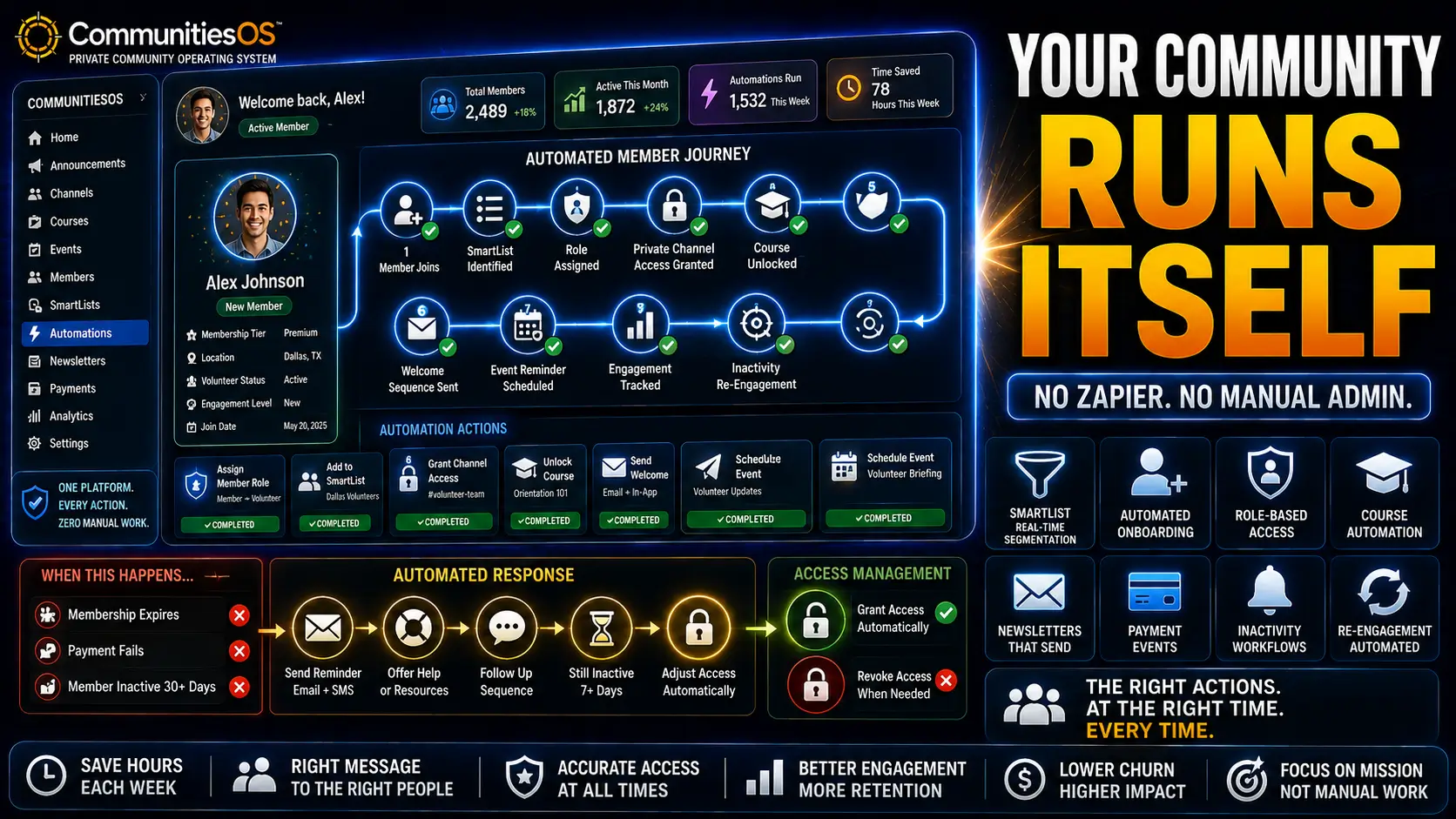
CommunitiesOS automates the full member lifecycle across four stages. Each stage runs without staff involvement, no manual handoff, no list export, no Zap to maintain.
When a member joins, the new-join trigger fires immediately. CommunitiesOS sends the welcome sequence, grants channel access for the appropriate tier, assigns the correct role, and fires the welcome newsletter, all in a single automated flow. The member arrives in the right place with the right access and a message waiting for them. Staff never touch it.
As the member participates, CommunitiesOS tracks course completions and gamification level changes. When a member completes a course, a recognition message fires and the next course unlocks automatically. When a member reaches a new gamification level, their channel access expands and a recognition message goes out. Every milestone is acknowledged. Every unlock is automatic.
When a member goes quiet, CommunitiesOS doesn't wait for staff to notice. An inactivity threshold trigger fires a re-engagement sequence at a defined interval. If the member doesn't respond, access can be adjusted or revoked based on rules you configure. No manual follow-up list. No reminder to check who has gone quiet.
When a payment processes on renewal, CommunitiesOS restores or continues access immediately. When a membership expires without renewal, the expiration trigger fires a graceful offboarding sequence, giving the member a final communication before access is revoked. The whole cycle runs without a staff member touching it.
Ready to see what automated looks like for your community? Book a Free Call → /book-a-call
CommunitiesOS grants and revokes channel access, course access, and roles automatically when a trigger fires. A tier change fires immediately. A payment event fires immediately. A course completion fires immediately. Staff do not touch it.
CommunitiesOS grants and revokes member access natively, no Zapier, no manual admin action, no webhook required, when a tier changes, a payment processes, a course completes, or a role is assigned.
This is the most specific gap in the community platform automation SERP: no competing platform answers the question "can a community platform automatically grant and revoke channel access?" with a native yes. CommunitiesOS answers it with a native yes, and applies it to channels, courses, and roles simultaneously.
What access management automation covers:
For churches managing ministry team channels, nonprofits gating volunteer resources, and associations controlling credential-level content, this removes the single most time-consuming manual task in community administration.
CommunitiesOS serves four categories of mission-driven organizations. Here is what native CRM automation looks like in practice for each.
A new member joins Sunday's service and fills out the connection card. CommunitiesOS fires the welcome sequence, grants access to the First Steps channel, and adds them to the New Members newsletter list automatically. When they complete First Steps, the next channel unlocks. Ministry team leaders never touch a roster. Learn how CommunitiesOS serves churches →
A volunteer completes their onboarding training. CommunitiesOS grants access to the Volunteer Hub channel, assigns the Volunteer role, and fires a congratulations sequence, all from a single course completion trigger. When their volunteer status lapses, access reverts automatically. Learn how CommunitiesOS serves nonprofits →
A member earns a continuing education credit. CommunitiesOS logs the course completion, fires a recognition message, and unlocks the next credential-level channel, no staff action required. Renewal automation sends reminder sequences at 60, 30, and 7 days before expiration. Learn how CommunitiesOS serves professional associations →
A member upgrades from Standard to Premium. CommunitiesOS fires the tier-change trigger, grants Premium channel access, revokes Standard-only channels, updates the SmartList segment, and fires the Premium welcome sequence, simultaneously. The member is in the right place before they refresh their browser.
These are the three most commonly evaluated community platforms for organizations moving away from Facebook Groups or fragmented tool stacks. Each has real strengths. None of them offers native community platform CRM automation at the level CommunitiesOS does.
Circle offers workflow automation, but it is gated behind higher-tier plans, organizations on lower tiers rely on Zapier for most member event automations. Circle does not have a native grant/revoke trigger. Access changes in Circle require manual admin action or a third-party Zapier workflow. For organizations that need access managed automatically on every tier change and payment event, Circle's architecture requires an external automation layer. Compare CommunitiesOS vs Circle →
Skool does not have native re-engagement automation, when a member goes inactive, no action fires automatically. Skool's flat community feed has no tier-based access differentiation and no structural segmentation. For membership organizations that need members in different channels based on their status, Skool's architecture is a fundamental mismatch. Compare CommunitiesOS vs Skool →
Mighty Networks does not have SmartList CRM integration, member segmentation requires Zapier or an API gated to the Scale plan. The Admin API is currently in alpha and limited to admin-level actions. For organizations that need real-time dynamic segmentation driving access and communication, Mighty Networks requires significant external infrastructure to approximate what CommunitiesOS does natively. Compare CommunitiesOS vs Mighty Networks →
CommunitiesOS includes automated newsletters natively. Newsletters can be scheduled on a fixed cadence or triggered by a member event, a new join, a tier change, a gamification level achievement, a course completion. No external email tool required. No Mailchimp account. No Constant Contact subscription. No export-and-import cycle every time your list changes.
For churches and nonprofits that have historically maintained a separate email list in Mailchimp alongside their community platform, this eliminates one of the most common sources of data drift. The CommunitiesOS newsletter list updates in real time as SmartList segments change. When a member upgrades, they move to the right list automatically. When a member lapses, they move off. The list is always current because it is the same data layer as the community itself.
Automated newsletters are included on every plan, Foundation, Growth, and Authority, at no additional cost.
CommunitiesOS offers a dedicated Automation Architecture service. The CommunitiesOS team designs and builds your SmartList segments, configures your workflow triggers, writes your re-engagement sequences, and sets up your access management rules, so your community runs on automation from day one without your staff learning a new system.
What's included:
CommunitiesOS is priced for mission-driven organizations, not extracted from them. Every plan includes native CRM automation, SmartList segmentation, workflow triggers, automated newsletters, and $0 transaction fees. Unlimited members on every plan. US-based support on every plan.
Mission-driven organizations across the US, from single-location churches to national professional associations, run on CommunitiesOS with $0 transaction fees and unlimited members on every plan.
or $970/year, 2 months free · cancel anytime
Everything a nonprofit, church, or association needs to build a private community, connect with every member, and run live meetings, at a flat monthly price with zero transaction fees.
or $2,970/year, 2 months free · cancel anytime
Everything in Foundation, the full platform, plus priority support, a dedicated account manager, and advanced operational tools for organizations running multiple programs, chapters, or initiatives at scale.
or $4,970/year, 2 months free · cancel anytime
Everything in Growth, the full platform, plus the highest level of dedicated support, enterprise reporting, and strategic partnership for established organizations where community is core to operations.
All plans include the full platform, zero transaction fees, unlimited members, and no contracts. Annual billing saves two months, pay for 10, get 12.
$0 transaction fees on every plan. Unlimited members on every plan. US-based support on every plan.
See full pricing details →What is CRM automation in a community platform?
CRM automation in a community platform means the platform itself triggers actions, granting access, sending sequences, revoking permissions, when member events happen, without connecting a separate CRM or Zapier. CommunitiesOS does this natively through SmartList segmentation and workflow triggers that fire on join, payment, course completion, level change, and inactivity.
What events can trigger an automation in CommunitiesOS?
CommunitiesOS fires automations on seven member events: new member join, tier change, course completion, gamification level change, payment event, inactivity period, and membership expiration. Each trigger can fire one or more actions, granting access, revoking access, assigning a role, sending a sequence, or firing an automated newsletter, natively, without Zapier.
Can CommunitiesOS automatically grant and revoke channel access without admin involvement?
Yes. CommunitiesOS grants and revokes channel access automatically when a trigger fires, a tier change, payment event, course completion, or role assignment. No admin action required. This is a native capability that Circle, Skool, and Mighty Networks do not offer without a third-party automation tool or manual intervention.
Do I need Zapier to automate member workflows in CommunitiesOS?
No. CommunitiesOS handles member workflow automation natively, no Zapier account, no webhook configuration, no third-party tool required. Triggers fire on member events inside the platform and execute actions inside the platform. For churches and nonprofits without a dedicated operations team, this eliminates an entire layer of technical setup and ongoing maintenance.
How does CommunitiesOS handle re-engagement for inactive members?
CommunitiesOS fires a re-engagement workflow automatically when a member reaches a defined inactivity threshold. The trigger sends a re-engagement sequence, updates the member's roster status, or revokes access based on rules you configure. This runs without staff involvement, no manual follow-up list, no Mailchimp integration, no reminder to check who has gone quiet.
Does CommunitiesOS include automated newsletters without a third-party email tool?
Yes. CommunitiesOS includes automated newsletters natively. Newsletters can be scheduled or triggered by a member event, a new join, tier change, or gamification level achievement. No Mailchimp or Constant Contact account required. For mission-driven organizations consolidating tools, this eliminates one more external dependency and keeps all member communication inside the platform.
What is SmartList and how does it work?
SmartList is CommunitiesOS's dynamic member segmentation tool. It filters members by any attribute combination, tier, engagement level, location, join date, or custom field, and updates in real time as member data changes. No manual list maintenance required. Organizations use SmartList to target sequences, control channel access, and segment newsletters without a separate CRM.
Can I automate course access based on a member's tier or payment event?
Yes. CommunitiesOS grants and revokes course access automatically when a payment event processes or a member's tier changes. Course completion can also trigger a follow-on action, sending a recognition message, unlocking the next course, or granting a new channel. All of this runs natively without connecting a third-party LMS or automation tool.
“We were spending three to four hours every week manually granting and revoking channel access as members upgraded or lapsed. CommunitiesOS automated all of it in the first week. Our admin lead hasn't touched a roster since.”Executive Director, Professional Association
“The re-engagement automation alone was worth switching. We were losing members quietly, no visibility, no outreach. Now CommunitiesOS catches them at thirty days inactive and fires the sequence automatically. Our retention improved in the first month.”Operations Director, Nonprofit Organization
“We had Zapier, Mailchimp, and a spreadsheet all trying to talk to each other. CommunitiesOS replaced all three. SmartList keeps our segments current and the triggers handle everything else. It's the first time our member data has been accurate.”Community Manager, Membership Organization
Mission-driven organizations shouldn't spend admin hours granting channel access, chasing re-engagements, and maintaining email lists by hand. That work belongs to your platform, not your staff.
CommunitiesOS gives churches, nonprofits, professional associations, and membership organizations native CRM automation built into the platform they're already running their community on. SmartList segmentation. Workflow triggers on every member event. Automated newsletters. $0 transaction fees. Unlimited members. US-based support.
No Zapier. No middleware. No manual work your platform should be doing for you.