How It Works

How CommunitiesOS Works — Your Community Platform, Live in Five Days

Most community platforms take months to set up. Agencies quote five months. Enterprise builds quote nine. CommunitiesOS gets churches, nonprofits, and associations live in five days — with no technical skills required and done-for-you setup available at $497.

Live in 5 DaysStandard SetupNo Technical SkillsRequiredDone-for-YouFrom $497US-Based SupportEvery Plan
Quick Answer

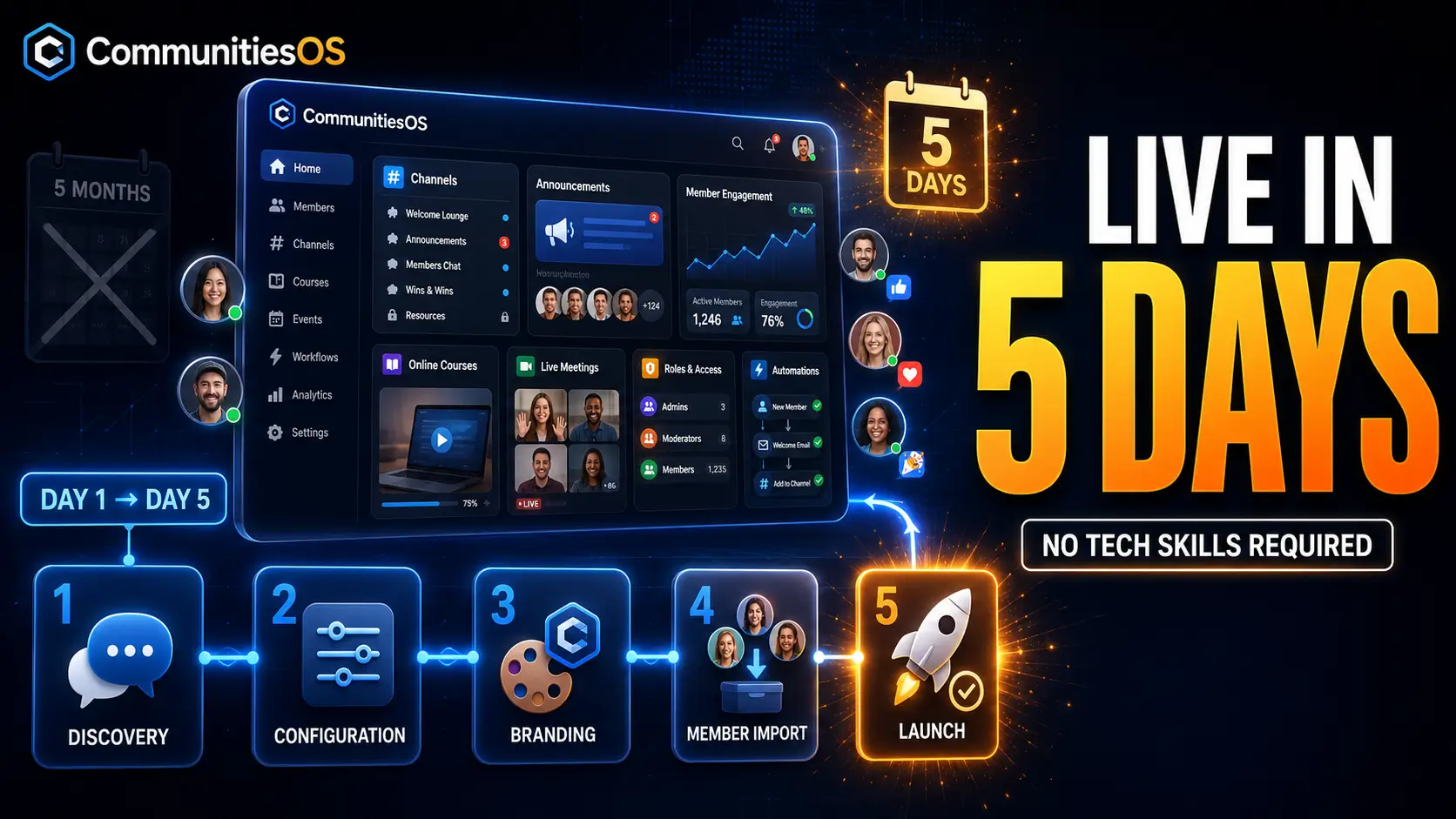
CommunitiesOS works in five steps: a discovery call, platform configuration, branding setup, member import, and launch. Standard setups go live in five days. Complex builds take ten. No technical skills are required, and done-for-you setup is available at $497 with migration from Facebook Groups, Circle, Skool, or Mighty Networks included.

Why Community Platform Setup Usually Takes Months — and Why It Doesn't Have To

Ask an agency how long it takes to launch a community platform and you'll hear five to six months. Ask an enterprise developer and you'll hear four to nine. Ask a consultancy and you'll hear eight to sixteen weeks. For a church with a part-time communications volunteer or a nonprofit with a three-person staff, those timelines aren't a plan — they're a wall.

ApproachTypical Timeline
Community strategy agency5–6 months
Custom enterprise build4–9 months
Enterprise consultancy setup8–16 weeks
Creator platform signupMinutes — but no structure
CommunitiesOS standard setup5 days
CommunitiesOS complex setup10 days
CommunitiesOS goes live in five days for a standard setup and ten days for a complex build. Community agencies typically quote five to six months. Custom enterprise builds run four to nine months.

The long timelines exist because those approaches are building infrastructure from scratch or configuring enterprise software that was never designed for mission-driven organizations. CommunitiesOS was built for churches, nonprofits, and associations from day one — which means the setup is configuration, not construction.

How CommunitiesOS Works — Five Steps From Signup to Live Community

The Discovery Call

Day 1

We start with a call — not a sales pitch, a working session. We map your organization: how many members, what committees or ministries or chapters exist, what you're currently using, what has to move over, and what you need on day one versus what can wait. By the end of the call, your channel structure, role hierarchy, and access rules are decided. Scope and timeline are confirmed.

Platform Configuration

Days 2–3

Your community gets built. Private channels for committees, ministries, or chapters. An announcement channel that pushes to every member. Roles assigned — Owner, Admin, Channel Manager, Contributor. Member approval questions configured. Access rules set so the right people see the right channels automatically. Standard setup includes one group, five channels, and three roles.

Branding and White Label

Days 3–4

Your logo, your colors, your domain. Members log in to a space that belongs to your organization — not a platform with your logo in the corner. White-label branding is included on every CommunitiesOS plan, not gated behind an enterprise tier. If you want a deeper branding build, White Label Branding is available as a service at $497 flat, delivered in three to five business days.

Member Import and Onboarding

Day 4

Members come over. If you're on Facebook Groups, Circle, Skool, or Mighty Networks, migration is included in Community Setup & Build at the same price. Members get invited, approved through your approval questions, sorted into the right channels by role, and dropped into a community that already has structure — not an empty feed.

Launch and the First Ninety Days

Day 5 and onward

You go live with a one-hour walkthrough. Your team learns the admin panel, how to post announcements, how to run a live meeting, how to add a course, and how to read member activity. Then US-based support stays with you. Not a ticket queue. Not an offshore chat window. Someone who knows the platform and knows mission-driven organizations.

Want us to run all five steps for you? Community Setup & Build is $497 → See the service →

What You Need to Get Started — and What You Don't

What You Need

  • A list of your members (spreadsheet, export, or CRM)
  • A sense of your structure — committees, ministries, chapters, teams
  • Your logo and brand colors
  • One person who can be the Owner account
  • One hour for the walkthrough call

What You Don't Need

  • Technical skills or a developer
  • A separate LMS, Zoom subscription, or email tool
  • A CRM integration project
  • A five-month strategy engagement
  • An IT department

Every agency page in this category implies you need a project team. You don't. CommunitiesOS was built so that a church administrator, a nonprofit program manager, or a volunteer association officer can run the community without a technical background.

What the Platform Does Once Your Community Is Live

Setup is five days. What happens after is what matters. Here's how the core capabilities work — every one of them included on every plan.

Channels and Announcements

Private channels segment your community by committee, ministry, chapter, or program. The announcement channel is admin-only and pushes to every member — no algorithm deciding who sees it. Community chat handles 1-on-1 conversations. Automatic newsletters go out without a Mailchimp account.

Courses and Learning

Build courses inside your community. Gate them by role, tier, or channel. Members progress through modules, and you see who's completed what. Free courses, paid courses, and advanced unlock rules — all native. No Teachable, Kajabi, Thinkific, or TalentLMS subscription required.

Live Meetings

The Meeting Room is interactive, with no attendee cap and no time limit. Stream software integration supports OBS and StreamYard for larger broadcasts. Replays are stored inside the community. Board meetings, Bible studies, chapter calls, and training sessions run without a separate Zoom line.

Automation and CRM

Workflow triggers fire on member events — a new join, a tier change, a course completion, a payment, or a period of inactivity. SmartList segments members dynamically. Access gets granted and revoked automatically. No Zapier account required.

Engagement and Gamification

Points, badges, and leaderboards with up to nine levels. Workflow triggers can fire when a member changes level. Pinned and featured posts. Unified search across every channel. Members who participate get recognized — automatically.

Member Management

Roles — Owner, Admin, Channel Manager, Contributor. Member approval questions gate who gets in. Private groups. Ban and report tools. Ownership transfer. SmartList group filters. Everything a real organization needs to govern a real membership.

CommunitiesOS is a private community platform built exclusively for mission-driven organizations — churches, nonprofits, professional associations, membership organizations, alumni networks, and volunteer organizations across the United States. Community is the product, not a feature bolted onto a course tool or a giving platform.

Ready to see this running for your organization? Book a Free Call →

How Migration Works — Facebook Groups, Circle, Skool, or Mighty Networks

Most organizations coming to CommunitiesOS aren't starting from zero. They're leaving something. Migration is included in Community Setup & Build at the same price — $497 standard, $1,497 complex — with no separate migration fee.

From Facebook Groups

Facebook offers no direct export path — members must be invited to the new platform manually. We handle that. Your content gets organized by topic instead of buried in a chronological feed. Your announcements reach every member instead of whoever the algorithm selects. Your organization owns the member data. Nonprofits and churches have been documenting this exact migration for years; it works.

From Circle

Members, channels, and content structure transfer. What you gain: $0 transaction fees instead of Circle's 2% on the Professional plan, no add-on charges for branded email or custom profile fields, and white-label branding without an enterprise upgrade.

From Skool

Members and course content transfer. What you gain: white-label branding, which Skool does not offer on any plan, and $0 transaction fees instead of 2.9% on the Pro plan.

From Mighty Networks

Members, spaces, and courses transfer. What you gain: $0 transaction fees instead of 2–3%, and branded experience without needing the $354/month tier.

Migration from Facebook Groups, Circle, Skool, and Mighty Networks is included in Community Setup and Build at the same price — $497 standard or $1,497 complex. There is no separate migration charge on any plan.

Ready to move? We'll map the migration on the first call.

Book a Free Call →

Set It Up Yourself, or Have Us Do It

CommunitiesOS delivers done-for-you setup to churches, nonprofits, and associations across the United States — every service is delivered by a US-based team on a fixed timeline at a fixed price.

Every CommunitiesOS plan includes the full platform. You can configure it yourself — the platform is built so that you can. But if your team is stretched thin, done-for-you setup is available at fixed prices with fixed timelines.

Do It Yourself

  • Included on every plan — Foundation, Growth, Authority
  • Full platform access from day one
  • Configure channels, roles, and branding yourself
  • US-based support available throughout
  • No additional cost

Done For You — Community Setup & Build

$497 standard · $1,497 complex5 days standard · 10 days complex
  • Standard scope: 1 group, 5 channels, 3 roles, standard branding, 1-hour walkthrough
  • Migration from Facebook Groups, Circle, Skool, or Mighty Networks included at the same price
→ See the full service

Other Done-for-You Services

  • Automation Architecture — $997 / $3,500 · 7 days / 10 days → Details
  • Course Creation — $997 / $2,500 · 7 days / 10 days → Details
  • White Label Branding — $497 flat · 3–5 business days → Details
  • Monetization Build — $1,997 / $5,000 · 7 days / 10 days → Details
View all services

How CommunitiesOS Works for Churches

Private channels for ministries, small groups, and volunteer teams. An announcement channel that reaches every member of the congregation — not the fraction an algorithm selects. Bible studies and training run in the Meeting Room with no time limit. Discipleship courses live inside the community. Member approval questions let you control who joins. For a church moving off Facebook Groups, the standard setup is live in five days.

→ CommunitiesOS for Churches

How CommunitiesOS Works for Nonprofits

Volunteer coordination in private channels. Donor and supporter communication through the announcement channel and automatic newsletters. Program delivery through courses. Board and committee meetings in the Meeting Room. Workflow automation that reclaims staff time — the Automation Architecture service targets five to ten hours per week. And $0 transaction fees on every dollar of member or program revenue, on every plan.

→ CommunitiesOS for Nonprofits

How CommunitiesOS Works for Professional Associations

Chapter channels. Committee structure with role-based access. Continuing education delivered as gated courses with progress tracking and completion certificates. Annual meetings and chapter calls in the Meeting Room. SmartList segmentation by membership tier, chapter, or renewal date. Unlimited members on every plan — so growth never triggers an upgrade.

→ CommunitiesOS for Professional Associations

What It Costs to Get Started

The platform and the setup are priced separately and transparently. Here is the full picture.

FOUNDATION$97/month · $970/year
GROWTH$297/month · $2,970/year
AUTHORITY$497/month · $4,970/year

All three include: $0 transaction fees · unlimited members · US-based support · full platform access. Annual billing: pay 10 months, get 12.

Setup Pricing

Community Setup & Build — $497 standard / $1,497 complex · 5 days / 10 days. Optional. Every plan includes the full platform whether you use the service or not.

→ See full pricing

More from CommunitiesOS

Frequently Asked Questions About How CommunitiesOS Works

How does CommunitiesOS work?

CommunitiesOS works in five steps: a discovery call, platform configuration, branding setup, member import, and launch. Standard setups go live in five days. Complex setups take ten. Every plan includes the full platform — channels, courses, live meetings, automation, gamification, and white-label branding — with no features gated behind higher tiers.

How long does it take to set up a community platform on CommunitiesOS?

Standard setup goes live in five days. Complex setups take ten days. This is dramatically faster than the industry norm — community agencies typically quote five to six months, and custom enterprise builds run four to nine months. CommunitiesOS is configuration, not construction.

Do I need technical skills to set up CommunitiesOS?

No. CommunitiesOS is built so a church administrator, nonprofit program manager, or volunteer association officer can configure and run the community without a developer. No coding, no integrations project, and no IT department required. Done-for-you setup is also available at $497 if your team is stretched thin.

What do I need before I start setting up CommunitiesOS?

You need a member list, a sense of your organizational structure, your logo and brand colors, one person to serve as Owner, and one hour for the walkthrough call. You do not need a developer, a separate LMS, a Zoom subscription, or a strategy engagement.

What happens on the discovery call?

The discovery call maps your organization — member count, committee or ministry structure, current tools, what needs to migrate, and what you need on day one. By the end of the call, your channel structure, role hierarchy, and access rules are decided, and scope and timeline are confirmed. It takes about an hour.

Organizations That Made the Switch

4.9/5Based on 47 reviews

[Testimonial quote to be added]

— [Organization Leader Name] · [Church Name] · [City, State]

[Testimonial quote to be added]

— [Organization Leader Name] · [Nonprofit Name] · [City, State]

[Testimonial quote to be added]

— [Organization Leader Name] · [Association Name] · [City, State]

Five Days From Now, Your Community Could Be Live

Not five months. Not sixteen weeks. Five days. Book a call, and we'll map your channels, roles, and structure on the first conversation — then build it. Done-for-you setup starts at $497, and migration from Facebook Groups, Circle, Skool, or Mighty Networks is included at the same price.