Use Case · Live Meetings

Replace Zoom With Live Meetings Built Into Your Community Platform

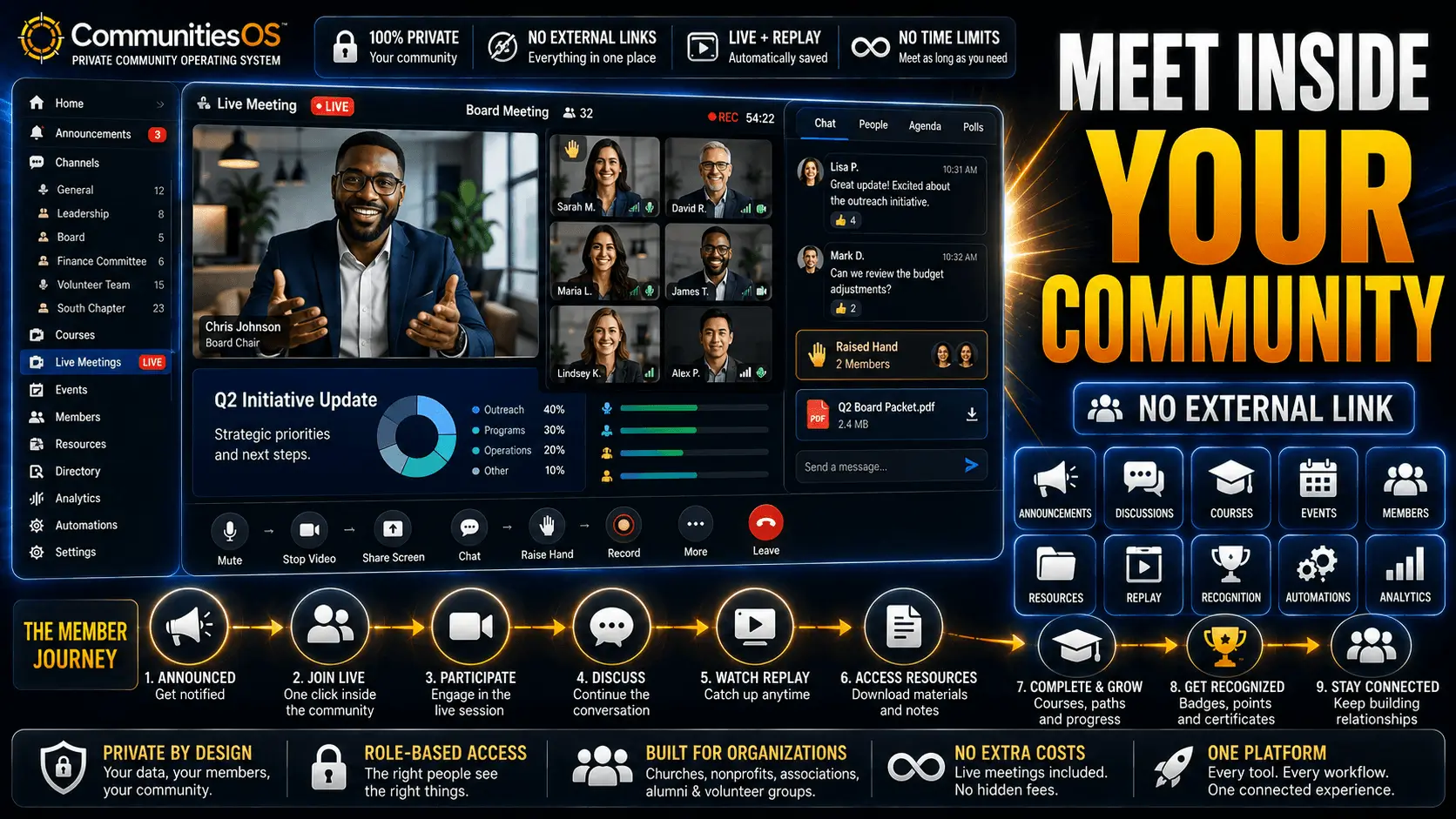
Churches, nonprofits, and associations are running board meetings, services, donor events, and chapter calls inside CommunitiesOS — with no time limit, no participant cap, and no Zoom account required.

No participant capNo time limitNo Zoom account requiredReplays auto-posted$0 transaction fees
Quick answer

CommunitiesOS includes Go Live — a native live meeting feature with no participant cap and no time limit. Meeting Room mode is fully interactive with audio and video for every member. Stream Software mode supports OBS and StreamYard. Replays post automatically inside your community after every session. No Zoom account required. No separate subscription. No per-host licensing fees.

What Is a Community Platform With Built-In Live Meetings?

A community platform with built-in live meetings is a private, members-only space where all organization activity — discussion, courses, announcements, events, and live sessions — happens in one place under one login. When a live meeting is built into the community platform, members don't receive an external Zoom link and leave their community to attend. They join the session inside the same platform where everything else happens, and the conversation continues in channels after the session ends.

Zoom creates a broken engagement loop. You schedule the meeting, send the link, members leave their platform to join Zoom, the session ends, and engagement evaporates. The follow-up email goes to an inbox. The recording goes to Zoom cloud. The conversation never picks up again. Mission-driven organizations — churches, nonprofits, associations, alumni groups — need the meeting to be part of the community, not a departure from it.

CommunitiesOS serves mission-driven organizations across the United States — churches, nonprofits, professional associations, and membership organizations — from Foundation at $97/month through Authority at $497/month, with Go Live included on every plan.

Why Zoom Is the Wrong Tool for Mission-Driven Organization Community Building

Zoom is a workplace meeting tool. It was designed for business teams, not for mission-driven organizations running community-centered work. The limitations aren't bugs — they're the product of a design philosophy that treats a meeting as the beginning and end of the interaction, rather than one moment inside an ongoing community.

  • 40-minute cap on free plan group meetings — every board meeting, Q&A, and service runs the risk of a cut-off mid-sentence
  • Per-host per-seat pricing — every additional meeting leader or committee chair adds another $13.33/month to the bill
  • No persistent channels between meetings — there is no community space where discussion continues after the call ends
  • No announcement channel — members must be emailed external Zoom links, with no guaranteed delivery inside the community
  • No built-in courses or content library — Zoom meetings cannot be connected to courses or learning paths inside the same platform
  • Recordings are meeting archives — they sit in Zoom cloud, not inside the community where members will actually watch them
  • No member roles, approval workflows, or gamification — Zoom has no concept of a community membership structure
  • Large meeting add-ons and webinar licenses sold separately — scaling past Zoom's base limits requires additional purchases
  • Members leave the community to attend the meeting — every Zoom session pulls members out of their community environment and into a separate tool

These aren't features Zoom will add. They're the result of being built as a meeting tool, not a community platform. For organizations that need members to feel like members — not meeting attendees — a standalone video tool is the wrong foundation.

CommunitiesOS Go Live — Two Modes, One Platform, No Zoom Required

CommunitiesOS includes Go Live — a native live meeting and broadcast feature built directly into the platform. No Zoom account required. No external link to send. Members join inside your branded community.

Meeting Room

Interactive live sessions with no participant cap and no time limit. Every member joins with full audio and video directly inside CommunitiesOS. Ideal for board meetings, committee calls, small group sessions, Q&As, member town halls, and any meeting where interaction matters. The session happens inside the community — before, during, and after.

Stream Software

Connect your existing broadcast setup — OBS, StreamYard, or any RTMP-compatible tool — and deliver the session directly into your CommunitiesOS community. Ideal for Sunday services, large organization-wide broadcasts, production-quality events, and any session where you want professional streaming without a separate streaming platform or distribution link.

After every Go Live session — Meeting Room or Stream Software — the replay is automatically posted inside the community. Members who missed the session watch it in the same place where all discussion, channels, and content live. No separate video hosting. No replay link to distribute. No Zoom cloud archive that members have to remember to check. The replay is just there, inside the community, where it belongs.

Replace Zoom for Most of What Your Organization Actually Needs

Zoom is a workplace meeting tool. Most of what churches, nonprofits, associations, and membership organizations do in Zoom — committee calls, board meetings, services, Q&As, chapter events — doesn't need a workplace meeting tool. It needs a community meeting tool.

ZoomCommunitiesOS Go Live
40-minute cap on free planNo time limit on every plan
Per-host per-seat pricing — $13.33/host/month minimumFlat monthly price — entire organization, unlimited hosts
Members click an external link and leave the communityMembers join inside CommunitiesOS — no external link
No persistent channels between sessionsDiscussion continues in private channels after every session
Recordings stored in Zoom cloudReplays posted automatically inside the community
No announcement channel — rely on email to distribute linksAdmin-only announcement channel with push notifications
No built-in courses or learning pathsCourses and live meetings in one platform
No member roles, approval workflows, or gamificationAll included on every plan
Compare full pricing →
Side by side

CommunitiesOS vs Zoom — Full Feature Comparison

FeatureCommunitiesOSZoom
Live meetings built-in✓ — Go Live (Meeting Room + Stream Software)✓ — meetings only
No participant cap✓ — every plan✗ — 100 on free; paid plans cap at 300
No time limit on meetings✓ — every plan✗ — 40-minute cap on free plan
Replays auto-posted inside platform✗ — stored in Zoom cloud
Private member channels
Admin-only announcement channel (push notifications)
Built-in courses (Learning tab)
Member roles and approval workflows
Gamification (points, badges, leaderboards)
CRM automation and SmartList
White-label branding
$0 transaction fees

CommunitiesOS is a community platform. Zoom is a meeting tool. For churches, nonprofits, associations, and membership organizations that need a permanent home for their members — with live meetings, courses, channels, and community built in — CommunitiesOS is the right choice. If you only need video calls, Zoom works. Most mission-driven organizations need more than video calls, and CommunitiesOS delivers the full community platform with live meetings included.

How Mission-Driven Organizations Use Go Live

Churches — Services, Small Groups, and Staff Meetings

Churches use CommunitiesOS Go Live for Sunday services via Stream Software mode — connecting OBS or StreamYard to broadcast directly into the community where members are already gathered. Small group meetings, prayer sessions, staff meetings, and volunteer training all run inside Meeting Room, with no participant cap and no time limit. Members who miss a live service watch the replay in the same community where they read announcements, join discussions, and engage with content during the week. See the full church platform →

Nonprofits — Board Meetings, Donor Events, and Volunteer Sessions

Nonprofits use CommunitiesOS Go Live for board of directors meetings with no time cap — every agenda item gets the time it needs. Donor appreciation events and stewardship sessions run inside the community where donors already engage with impact updates and program news. Volunteer orientation, staff all-hands, and program briefings for stakeholders all happen inside the same platform as the community discussion, so post-meeting action items continue immediately in the relevant channel. See the full nonprofit platform →

Professional Associations — Chapter Calls, Town Halls, and Working Groups

Professional associations use CommunitiesOS Go Live for chapter and regional meetings, national leadership sessions, new member orientation calls, and working group virtual sessions. Every session runs inside the community where members network, access resources, and engage with governance updates — so attendance at a Go Live session reinforces the value of community membership rather than pulling members to a separate tool. Member Q&As with leadership run in Meeting Room mode with no time pressure. See the full association platform →

Alumni Organizations — Virtual Reunions, Class Chapters, and Career Events

Alumni organizations use CommunitiesOS Go Live for virtual reunions, class chapter meetings, mentorship session series, and career events and panels. Meeting Room mode supports interactive sessions where alumni join with video and audio — the same experience as an in-person networking event, hosted inside the alumni community platform. Every session replay is stored inside the community, building a library of alumni events accessible to members who couldn't attend live.

What CommunitiesOS Costs — and What Zoom Costs at Scale

CommunitiesOS Foundation starts at $97/month for the entire organization. That covers Go Live — Meeting Room and Stream Software — plus unlimited members, private channels, courses, gamification, CRM automation, announcement channel, and US-based support. Everything included. Zoom Pro starts at $13.33 per host per month for meetings only. Every meeting host you add costs another $13.33/month. Webinars, large meeting capacity beyond 300 participants, and cloud storage are each sold as separate add-ons. For organizations with more than eight meeting hosts, CommunitiesOS Foundation is already the lower total cost — and it includes the full community platform, not just meetings.

Best for most nonprofits, churches, and single-location associations

Foundation

$97/mo

or $970/year — 2 months free · cancel anytime

Everything a nonprofit, church, or association needs to build a private community, connect with every member, and run live meetings — at a flat monthly price with zero transaction fees.

Everything included:
  • Full platform access — every feature on every plan
  • Unlimited members — no per-member fees ever
  • Zero transaction fees on dues, donations, and events
  • Private channels, announcement channel, community chat
  • Courses, live meetings, events, and gamification
  • Workflow automation and SmartList CRM
  • White-label branding and custom domain
  • Member roles, approval questions, and access control
  • Automatic newsletters and member tagging
  • Full member data ownership and export
  • US-based onboarding support

Growth

$297/mo

or $2,970/year — 2 months free · cancel anytime

Everything in Foundation — the full platform — plus priority support, a dedicated account manager, and advanced operational tools for organizations running multiple programs, chapters, or initiatives at scale.

Everything in Foundation, plus:
  • Priority US-based support
  • Dedicated account manager
  • Advanced analytics and engagement reporting
  • Multiple community spaces for chapters or programs
  • Advanced member segmentation and targeting
  • Custom member onboarding flows
  • Enhanced live event capabilities
Best for multi-chapter associations and professional networks at scale

Authority

$497/mo

or $4,970/year — 2 months free · cancel anytime

Everything in Growth — the full platform — plus the highest level of dedicated support, enterprise reporting, and strategic partnership for established organizations where community is core to operations.

Everything in Growth, plus:
  • Highest-priority support with guaranteed response time
  • Dedicated onboarding specialist
  • Multi-chapter and multi-location management
  • Enterprise analytics and custom reporting
  • Custom integrations and API access
  • Quarterly strategic review with account team

All plans include the full platform, zero transaction fees, unlimited members, and no contracts. Annual billing saves two months — pay for 10, get 12.

$0 transaction fees · Unlimited members · US-based support — on every plan.

Works Alongside the Rest of Your Community

Frequently Asked Questions About Replacing Zoom With a Community Platform

Can I replace Zoom with a community platform?

Yes — CommunitiesOS Go Live replaces Zoom for most organizational meeting needs with no participant cap, no time limit, and no separate account required. Members join inside the same platform they already use, eliminating the separate login and the broken engagement loop that comes with running meetings on a standalone tool.

What is the best Zoom alternative for nonprofits?

The best Zoom alternative for nonprofits hosts board meetings, donor events, and volunteer sessions inside the community members already use — no separate login, no broken engagement loop after the call ends. CommunitiesOS Go Live gives nonprofits unlimited meeting duration, no participant cap, and automatic replay posting — all included on every plan starting at $97/month with zero transaction fees.

What is the best Zoom alternative for churches?

The best Zoom alternative for churches hosts services, prayer meetings, and Q&As inside the community the congregation already uses. CommunitiesOS Go Live offers Meeting Room for interactive sessions and Stream Software mode for broadcasting via OBS or StreamYard — both inside the community with no time limits, no participant caps, and no separate video platform required.

What is the best Zoom alternative for professional associations?

The best Zoom alternative for professional associations runs chapter meetings, leadership sessions, and member town halls inside the community where members already network and engage. CommunitiesOS Go Live requires no separate Zoom account, no per-host license, and no participant cap — and every session replay is posted automatically inside the community on every plan.

What does Zoom not have that CommunitiesOS does?

Zoom does not include persistent member channels, async community discussion, built-in courses, member roles and approval workflows, gamification with points and leaderboards, admin-only announcement channels, workflow automation, or white-label branding. CommunitiesOS includes all of these features on every plan — along with Go Live for live meetings — with zero transaction fees and unlimited members.
Mission-Driven Organizations That Replaced Zoom With CommunitiesOS

We were paying for Zoom Pro plus webinar add-ons plus a separate course platform. CommunitiesOS replaced all three. Now our board meetings, member sessions, and training all happen inside one platform our members already log into every week.— Executive Director, Nonprofit Organization
The 40-minute Zoom limit was embarrassing during board meetings. We'd get kicked out mid-discussion and spend five minutes reconnecting. CommunitiesOS Go Live has no time limit — we haven't been interrupted once.— Board Chair, Professional Association
We used to send three separate emails to get members to a Zoom call — the initial invite, a reminder, and a replay link. Now we post one announcement in CommunitiesOS. Members join the live session from inside the community, and the replay is already there when it ends.— Pastor, Community Church
4.9 out of 5 — based on 47 reviews
Built for mission-driven orgs

Keep Every Meeting Inside Your Community

Stop sending members to Zoom and losing them when the call ends. CommunitiesOS Go Live runs every meeting inside your community — where the discussion continues, the replay lives, and the membership stays connected long after the session ends.